The Smartphone Cyber Threat Landscape in 2026
In addition to devices for making calls or sending messages, smartphones serve as digital wallets, authentication tokens, cameras, workspaces, entertainment centers, navigation systems, gateways to dozens of online accounts, and more. For many people, losing control of a smartphone could mean losing access to email, banking, social media, cloud storage, business systems, and sensitive personal information. This makes smartphones an increasingly attractive target for cybercriminals.
90% of adults aged 18 to 64 own a smartphone, while ownership is 78% among adults aged 65 and older.
-Pew Research Center’s latest U.S. data
The smartphone threat landscape in 2026 is shaped by familiar threats, such as malware, phishing, credential theft, malicious applications, and network attacks, but also by increasingly sophisticated AI-powered social engineering attacks, spyware, and brute-force attacks designed to exploit the enormous amount of information smartphones contain.
So, what can consumers do to secure their smartphones in 2026? Let’s find out:
10 Essential Smartphone Security Practices for 2026
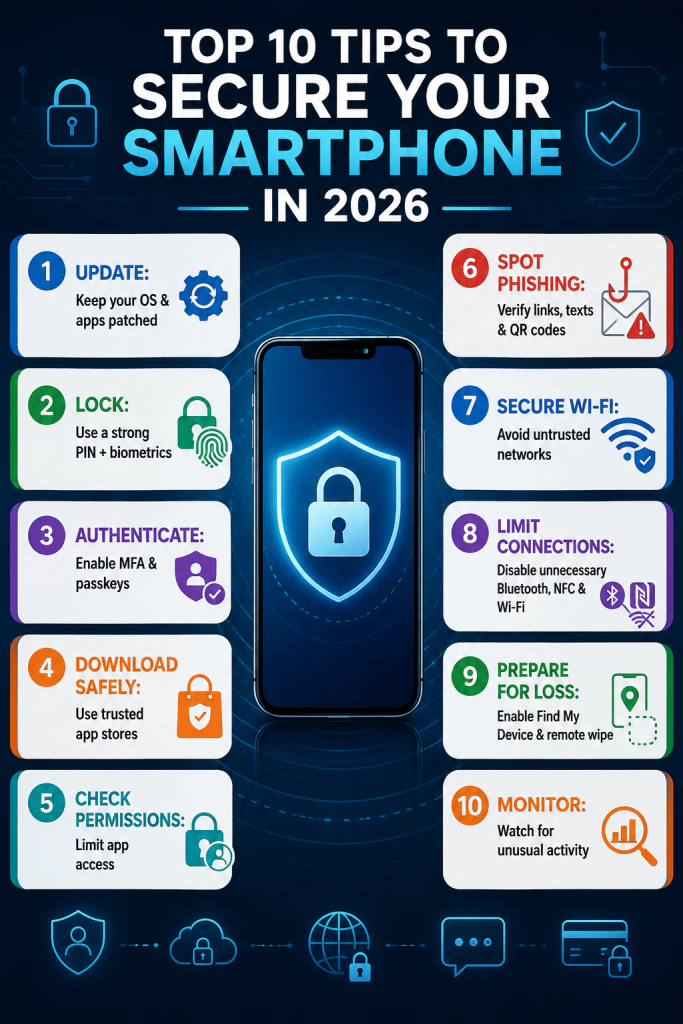
1. Make Security Updates a Priority
One of the simplest (yet most frequently ignored) security practices is keeping the smartphone’s operating system and applications up to date. Software vulnerabilities can provide attackers with opportunities to gain unauthorized access, escalate privileges, steal information, or execute malicious actions.
Enable automatic updates whenever possible. Don’t repeatedly postpone an operating-system security update simply because the phone appears to be functioning normally.
2. Strengthen Your Phone’s Lock Screen
One of the first layers of smartphone security is physical access control. Use a strong PIN or password rather than an easily guessed combination such as a birthday, address, or repeated digits. Biometrics such as fingerprint or facial recognition can provide additional convenience and security when properly implemented. Also, configure automatic screen locking after a short period of inactivity.
A compromised online account is dangerous. A lost smartphone containing unlocked email, financial, authentication, and personal applications can be even more consequential.
3. Move Beyond Passwords and SMS Codes
Your smartphone often serves as the gateway to your most important digital accounts. Protect those accounts with multifactor authentication (MFA). But keep in mind, not all MFA methods provide the same level of protection. Where supported, you should consider passkeys and phishing-resistant authentication, particularly for high-value accounts. SMS-based authentication can still provide additional protection compared with passwords alone, but stronger authentication methods can reduce exposure to phishing and other credential-theft attacks.
The objective is to ensure that stealing a password is not enough for an attacker to take over an account.
4. Download Apps Carefully
Smartphone users routinely install applications without considering what those applications can potentially access. This creates an important security question: Do you really know what you are installing?
Use official application stores and avoid downloading applications from unfamiliar websites or unofficial app repositories. Sideloading can bypass some of the security checks associated with official app distribution. Even legitimate applications can introduce risk if they are compromised or maliciously modified. Attackers who obtain application developer credentials could replace a legitimate application with a malware-infected version.
5. Audit App Permissions
Installing a legitimate application does not automatically mean it should have unrestricted access to your smartphone.
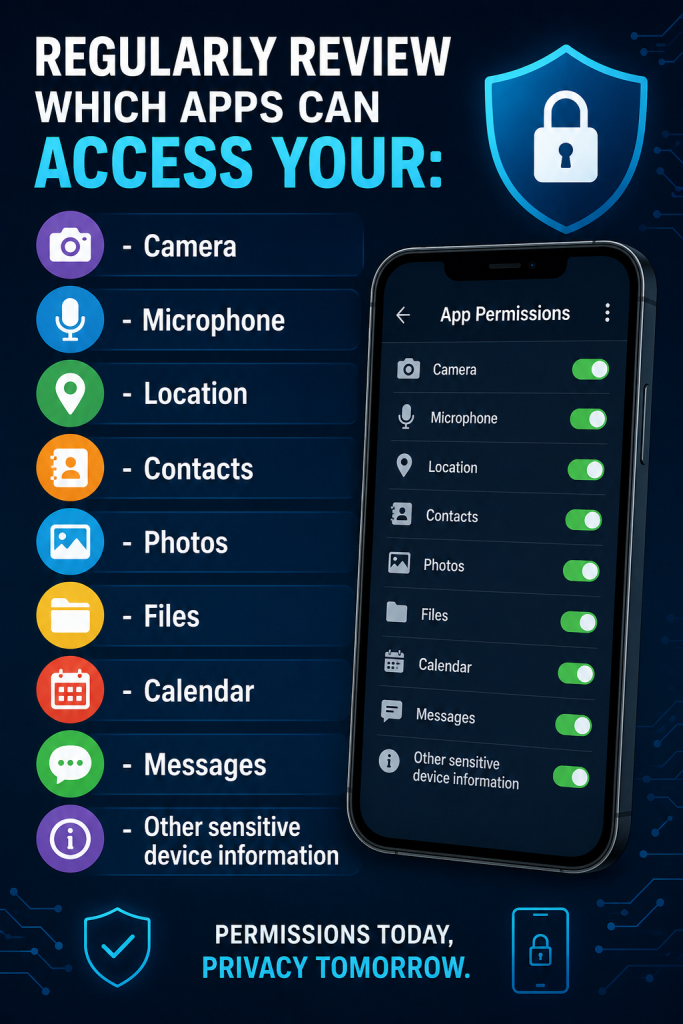
Ask whether each permission is genuinely necessary. For example, a navigation application may legitimately require access to location data. A simple flashlight application should generally have no reason to access your contacts. Good smartphone security means minimizing access rather than granting permissions by default.
6. Treat Every Unexpected Message as Suspicious
Phishing has moved far beyond traditional email. In 2026, smartphone users should be alert to smishing, malicious messages, fake delivery notifications, fraudulent account alerts, QR code scams (quishing), and impersonation attempts.
A message or notification might claim that:
- Your bank account has been suspended.
- A package requires immediate payment.
- Your streaming subscription has expired.
- Your account needs verification.
- You have won a prize.
- Your employer requires an urgent login.
The goal is often to create urgency so that users act before they think. Don’t click first and investigate later. Instead, independently open the organization’s official application or website and verify the request.
7. Be Selective About Public Wi-Fi
Free Wi-Fi can be convenient, but you should avoid treating every public network as trustworthy. Attackers can exploit poorly secured networks or create deceptive networks designed to trick users into connecting. Sensitive activities, particularly banking, financial transactions, or access to confidential work systems, deserve additional caution on unfamiliar networks.
When using public connectivity, minimize sensitive activity and ensure that websites and applications use secure, encrypted connections. For organizations, additional controls such as VPNs and mobile-device management can provide stronger protection.
8. Reduce Your Wireless Attack Surface
Bluetooth, Wi-Fi, NFC, mobile hotspots, and other connectivity technologies make smartphones incredibly useful, but every active interface can also represent another potential avenue of attack. Turn off connectivity features when they are unnecessary, particularly in unfamiliar environments. Also, review which devices and services have previously been paired with your smartphone. Remove old or unfamiliar connections.
This is a simple cybersecurity principle that remains highly relevant in 2026: If you don’t need a digital connection, don’t leave it unnecessarily exposed.
9. Prepare for Loss or Theft
Cybersecurity is not only about preventing remote attacks. Physical theft remains a significant smartphone security concern. Enable your phone’s built-in device location and recovery features. Make sure you know how to lock the device remotely and, when necessary, erase its contents. Back up important information regularly so that losing the physical device does not mean losing irreplaceable data.
You should also consider what information appears on the lock screen. Excessive notification previews expose sensitive messages, authentication codes, or personal information to someone who can physically see the device.
10. Pay Attention to Strange Smartphone Behavior
Your smartphone can sometimes provide warning signs that something is wrong.
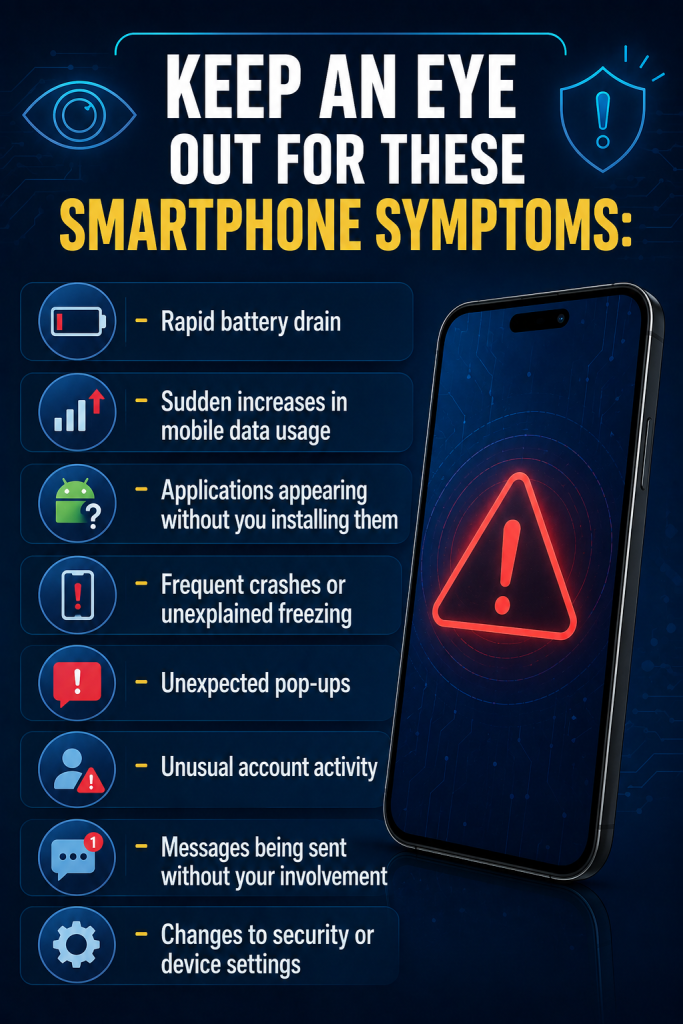
These symptoms do not automatically mean that a smartphone has been hacked. However, they should prompt an investigation.
Smartphone Security is Now Digital-Life Security
The biggest mistake consumers can make in 2026 is thinking about smartphone security as simply “protecting a phone.”
But your smartphone has essentially become the control center for your digital identity. It contains authentication credentials, financial applications, photographs, private conversations, corporate data, password-manager access, healthcare information, location history, and connections to other devices and services. Consequently, securing the smartphone protects far more than the hardware itself.
The strongest approach is layered. Keep software updated, strengthen authentication, scrutinize applications, minimize permissions, recognize social engineering, secure wireless connections, prepare for device loss, and monitor for unusual activity. No single security measure can eliminate every threat. But when multiple protective layers work together, attackers face significantly more obstacles.
Frequently Asked Questions About Smartphone Security
Smartphone security refers to the technologies, controls, and user practices used to protect mobile devices, applications, accounts, networks, and the information stored or accessed through smartphones. It includes software updates, strong authentication, app security, permission management, network security, and protection against phishing and malware.
Start with the fundamentals: keep the operating system and apps updated, use a strong PIN or password, enable biometric authentication and MFA, download apps from trusted sources, review app permissions, avoid suspicious links and QR codes, secure wireless connections, enable remote device recovery, and monitor for unusual activity.
Public Wi-Fi networks can introduce security risks, particularly when users connect to malicious or poorly secured networks. Avoid sensitive activities on unfamiliar networks and use appropriate security controls when connecting remotely.
Only when the permission is necessary. Review location permissions regularly and consider limiting access to situations where the application actually needs your location.
A strong PIN is an important security layer, but it should not be your only defense. Combine device authentication with biometric security where appropriate, strong account passwords or passkeys, MFA, software updates, and other protective measures.
Disconnect the device from suspicious networks if appropriate, investigate recently installed applications and configuration changes, update the operating system, review account activity, change compromised credentials from a trusted device, and contact relevant service providers if financial or account information may have been exposed. If compromise is suspected to be serious, seek professional cybersecurity assistance.