You probably juggle more passwords than you can remember. So you reuse a few, write some down, or reset them constantly. Attackers count on exactly that.
Passkeys promise a way out. They let you sign in with your face, fingerprint, or device PIN. Nothing gets typed, remembered, or handed to a fake login page. Major platforms now nudge new users toward them first.
So is it time to ditch passwords for good? This blog compares passkeys and passwords side by side. You will learn how passkeys work and why passwords keep failing. We also cover the downsides most guides skip. Then you get a simple plan to make the switch. Finally, we look at what passwordless means for businesses.
Key Takeaways
- Passkeys replace passwords with your face, fingerprint, or device PIN.
- They resist phishing because they only work on the real website.
- Passkey sign-ins are faster and fail less often than passwords.
- Stolen and reused passwords still fuel a large share of data breaches.
- Passkeys have some downsides, especially regarding lost devices and account recovery.
- You can switch to passkeys one account at a time, starting with email.
- Businesses should combine passkeys with a strong account recovery plan.
What Is a Passkey?
A passkey is a sign-in method that replaces your password. It uses a pair of cryptographic keys, not a typed secret. You unlock it with your face, fingerprint, PIN, or pattern. The passkey itself stays safely on your device or password manager.
Passkeys run on open standards from the FIDO Alliance and W3C. That means they work across Google, Apple, Microsoft, and many more.
They are no longer niche. The FIDO Alliance now estimates 7 billion passkeys are in use worldwide.
How Passkeys Work, in Plain Language
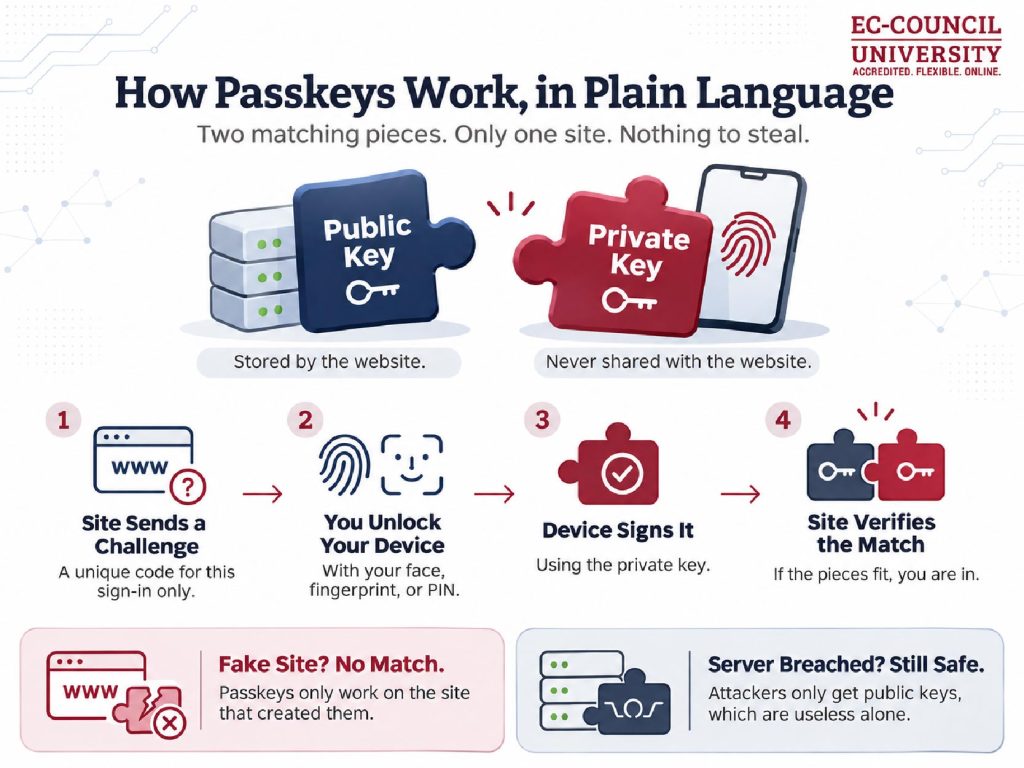
Every passkey has two parts. A public key lives on the website’s server. A private key stays on your device and never leaves it.
When you sign in, the site sends a unique challenge. Your device signs it with the private key after you unlock it. The site checks that signature with the public key. If it matches, you are in.
Here is the clever part. Each passkey is tied to the exact website that created it. So a fake login page cannot trigger it at all. That is what makes passkeys phishing-resistant.
There is a bonus, too. A server breach exposes only public keys, which are useless to attackers.
Passkeys vs. Passwords: Side-by-Side
| Passwords | Passkeys | |
|---|---|---|
| How you sign in | Type a secret you remember | Unlock with face, fingerprint, or PIN |
| Phishing risk | High, since anyone can type them into a fake site | Very low, since they only work on the real site |
| Reuse risk | Often reused across many sites | Unique for every site |
| If the site is breached | Stolen hashes can be cracked and reused | Only useless public keys are exposed |
| Speed | Slower, often with an extra code | Faster, with one tap or glance |
| Recovery | Simple reset by email | Depends on your device and sync setup |
| Support | Works almost everywhere | Supported by many, but not all, sites |
The numbers favor passkeys clearly. FIDO’s Passkey Index 2026 found passkey sign-ins succeed 93% of the time. Traditional MFA sign-ins succeed 78% of the time. Passkeys also save users an average of 27 seconds per sign-in.
Microsoft sees an even wider gap. Passkey sign-ins succeed about 98% of the time there. Password sign-ins succeed only 32% of the time.
Usage is climbing fast, too. Now 36% of successful sign-ins use a passkey.
Why Passwords Keep Failing
Passwords have a basic flaw. Anyone who learns one can use it.
Attackers get them in many ways. Phishing pages trick people into typing them. Infostealer malware grabs saved passwords from infected devices. Old breaches leak them onto criminal markets.
The latest data shows the damage. Verizon’s 2026 breach report found stolen credentials in 36% of breaches. A median 6% of users reuse passwords or share them.
Attack volume is staggering, too. Microsoft tracked over 7,000 password attacks per second in 2024.
To be fair, there is some good news. Exploited vulnerabilities just overtook stolen credentials as the top entry point. But passwords remain a major risk, and attackers keep targeting them.
The Downsides of Passkeys Nobody Mentions
- Losing your only device hurts. If your passkey lives on one phone, losing it can lock you out. Synced passkeys and backup sign-in methods solve this.
- Switching ecosystems takes effort. Moving from iPhone to Android can mean re-creating some passkeys. Cross-platform syncing keeps improving, but it is not seamless yet.
- Account recovery is the weak spot. Many sites still fall back to email or SMS codes. Attackers may target that fallback instead.
- Not every site supports them. You will still need a password manager for the rest.
- Shared devices get tricky. A family tablet or work kiosk can blur who holds which passkey.
How to Switch to Passkeys, Step by Step
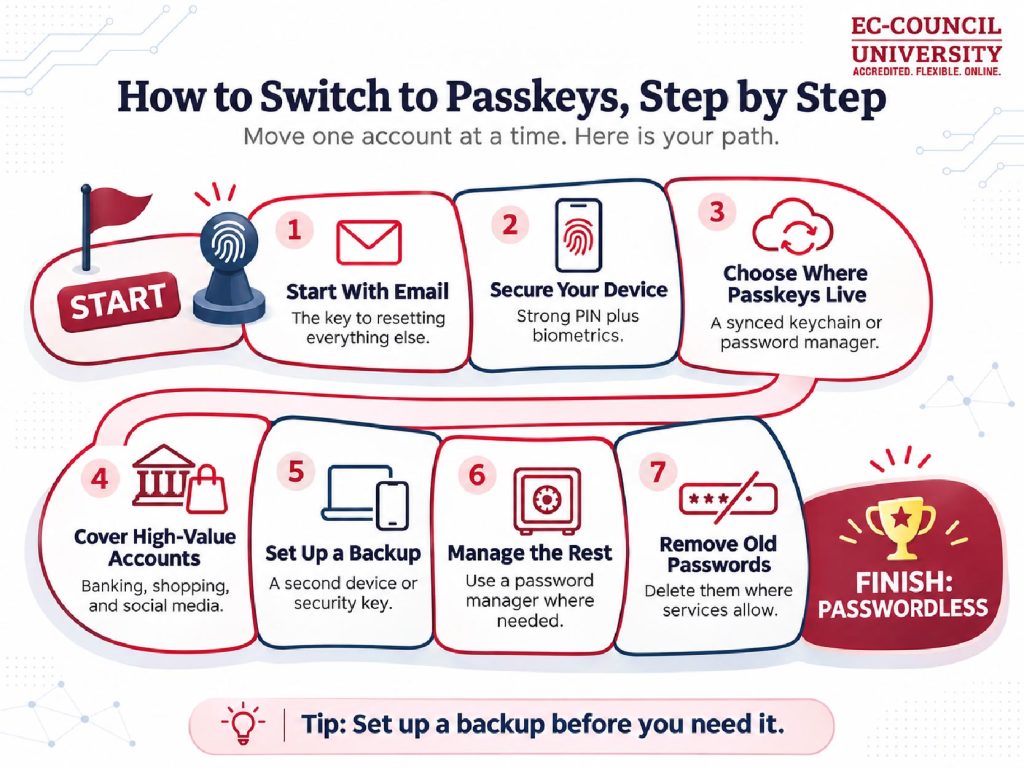
You do not need to switch everything at once. Move one account at a time:
- Start with your email account. Email is the key to resetting everything else. Add a passkey there first.
- Secure your phone or computer. Set a strong device PIN and turn on biometrics. Your passkeys are only as safe as your device. These smartphone security tips can help.
- Pick where your passkeys will live. Use your platform’s keychain or a trusted password manager. Make sure it syncs across your devices.
- Add passkeys to high-value accounts. Cover banking, shopping, and social media next. Look for “Create a passkey” in each site’s security settings.
- Set up a backup. Register a second device or a hardware security key. This protects you if you lose your phone.
- Keep a password manager for the rest. Use long, unique passwords where passkeys are not offered yet.
- Remove old passwords where you can. Some services let you delete your password entirely. That closes the door attackers use most.
Should Businesses Go Passwordless?
For most organizations, the answer is yes, with a plan. Passwords still dominate the workplace today. 57% of organizations still use passwords as the main employee sign-in.
Standards now support the shift. NIST’s latest digital identity guidelines accept synced passkeys for higher-assurance sign-ins. NIST also steers organizations away from one-time codes, which attackers can phish.
That matters because modern phishing kits defeat codes and push approvals. They relay the login in real time and steal the session. Passkeys stop this, since they refuse to work on a fake site.
A smart rollout starts small. Begin with admins and other high-risk users. Pair passkeys with device management and a hardened recovery process. Then expand to everyone, team by team.
One caution for IT teams. Passkeys protect people, not the service accounts running in the background. Machine identities and API keys still need their own controls.
Skills Behind a Passwordless Future
Passkeys change how people sign in. They also create new work for security teams. Someone has to plan rollouts, secure recovery, and spot attacks on fallbacks. Identity security skills matter more than ever.
ECCU offers two paths into this work.
Bachelor of Science in Cyber Security: This degree builds your foundation in how attacks work and how to stop them. It suits newcomers and career changers. You also practice in hands-on virtual labs.
MSCS Security Analyst: This track covers threat monitoring, vulnerability assessment, and SOC operations. You learn to detect credential attacks and phishing in real environments. It suits professionals ready for the next step.
Ready to build skills for a passwordless world? Talk to an ECCU enrollment advisor and map your next step.
Frequently Asked Questions
What is a passkey?
A passkey is a password replacement built on cryptographic keys. You unlock it with your face, fingerprint, or device PIN. It works only on the website that created it.
Are passkeys safer than passwords?
Yes, in most cases. Passkeys resist phishing and cannot be reused across sites. A site breach also exposes nothing attackers can use to sign in.
What happens if I lose my phone?
If your passkeys sync to the cloud, you can restore them on a new device. A backup device or security key also keeps you covered. Set this up before you need it.
Can I use passkeys on any website?
Not yet. Many major sites support them, but plenty still do not. Use a password manager for accounts without passkey support.
Do passkeys replace two-factor authentication?
In most cases, yes. A passkey combines something you have with something you are or know. That makes it a strong form of multi-factor authentication on its own.
Should my business switch to passkeys?
Most businesses should start now. Begin with admins and high-risk users, then expand. Pair the rollout with device management and a secure recovery process.