

By Deepak Singh
Every security professional knows this feeling. You lock something down, and then it stops working.
Sometimes a firewall rule blocks a legitimate app. Sometimes a strict policy breaks a perfectly good script. It’s frustrating. It’s also a sign that security is doing its job.
I hit this exact moment while benchmarking four Linux distros. Three of them run my AI training tests without complaint. The fourth refuses to cooperate.
That fourth distro is Parrot OS. And the way it says no teaches me more than any speed chart.
Meet Parrot OS
Parrot OS serves people who think about attacks for a living. Penetration testers, security researchers and privacy-minded users all lean on it.
It ships with a large toolkit for testing and analysis. Sandboxing tools come pre-installed. Updates arrive as rolling releases, so new fixes and features land quickly.
It shares this space with Kali Linux. Both put security work first and everyday use second.
Parrot is flexible, too. It installs in a lightweight, modular way. It runs well in the cloud and in virtual environments. It even offers ready-made Docker images.
So on paper, containers should pose no problem. That’s what makes the next part so interesting.
The moment the experiment hits a wall
My test setup is simple. Each distro runs in its own virtual machine with identical settings. The AI tests run inside Docker containers. That way, every system trains the same models in the same way.
On Ubuntu, Debian and Bodhi, the containers start up and train without trouble. On Parrot OS, they never start at all.
I test every distro out of the box, with no tweaks. And out of the box, Parrot’s security policies block containers built from other distributions. My containers come from a different base image. Parrot treats them as untrusted and shuts them out.
So Parrot drops out of the AI training comparison entirely. No result. Just a locked door.
Why the locked door makes sense
At first, it feels like a failure. Then I look at it through a security lens.
Containers are powerful. They also bring outside code onto your system. An image from an unknown source can carry vulnerabilities, misconfigurations or something worse.
A security-first distro starts from a simple stance. Trust nothing by default. Make the user prove something is safe.
That stance carries real value. Linux kernels face a steady stream of threats. Privilege escalation, denial-of-service and IP spoofing top the list. Patches arrive as researchers find each flaw.
Strong defaults and tight access controls add another layer on top.
Parrot simply applies that thinking to containers. It blocks first and lets you open the door on purpose.
There’s a cost, of course. Speed and convenience always pay for security somewhere. Even the Linux kernel itself grows slower across versions, partly because of security fixes. Parrot just makes the trade-off impossible to miss.
The fix: play by Parrot's rules
The workaround is straightforward. Need containers on a security-focused distro? Build them from that distro’s own base image.
That way, the container and the host speak the same language. The security policies recognize what they see. Compatibility problems shrink.
It takes a little extra effort upfront. In return, every protection stays switched on.
That lesson reaches well beyond Parrot. When a security control blocks you, work with it. Don’t rush to disable it.
Where Parrot OS surprises me
Parrot sits out the AI test, but it competes everywhere else. And it holds its own.
In my number-crunching test, each distro calculates pi using 10 million terms of a math series. Parrot finishes second out of four. It beats both Ubuntu and Debian. Only the lightweight Bodhi runs faster.
The file tests tell a similar story, at least in Bash. My scripts create, open, write and delete batches of files. The batches double in size, from 2 files up to 2,048. In Bash, Parrot opens and writes small batches faster than any other distro. As the batches grow, all four distros settle at similar speeds.
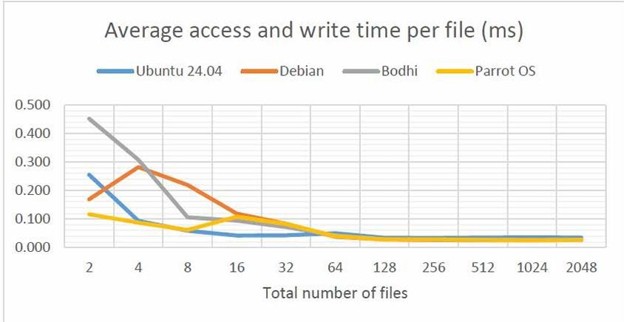
That result challenges a common belief. Many people assume security distros feel heavy and sluggish. In these tests, Parrot proves surprisingly quick.
The catch
Parrot’s strengths come with some clear weak spots.
First, it uses more memory than its rivals in the math test. On a powerful machine, that barely registers. On limited hardware, it adds up fast.
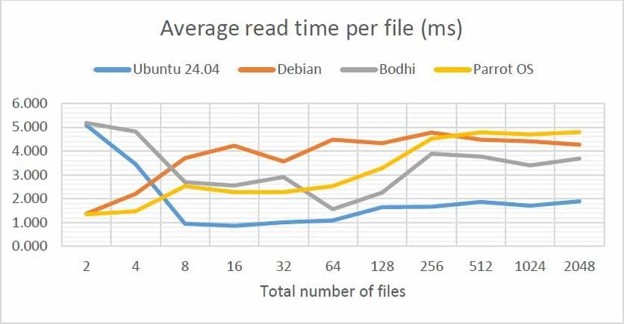
Second, it slows down sharply when reading files in Bash. Its other file operations fly, while reading lags well behind. My best guess points to security checks and kernel tuning. Each read may pass through extra layers of inspection.
Third, Parrot struggles with file handling in Python. Its timings show sudden spikes as the file count grows. In my Python tests, it ranks as the weakest of the four.
So Parrot looks fast in some places and slow in others. Your workload decides which side you see.
Plot twist: your tools matter more than your OS
The file tests also reveal something I never expect. The scripting language makes a bigger difference than the distro.
I run every file test twice, once in Bash and once in Python. Across all four distros, the same patterns appear.
Python is generally faster. It’s also far more consistent. Its results barely shift from one distro to the next. Opening, writing and deleting files take steady time per file. The number of files hardly changes that.
Bash behaves differently. It creates files much faster than Python. It also handles big reading jobs better, especially past 256 files. However, its timings jump around more, and it falls behind on writing.
These patterns repeat on every distro. That points to the language as the main driver, with the OS playing a smaller role.
One more pattern holds everywhere. Reading files takes the most time of any operation. That may come from the order my scripts run things. It may also reflect how each OS schedules the work. I want to dig into that question next.
The practical takeaway is simple. Before you swap your whole OS for speed, look at your tools. A different language might give you a bigger boost.
How I'd pick a distro now
After all this testing, my choices look like this:
- Ubuntu: For AI and machine learning work. It trains models far faster than the others in my setup.
- Bodhi Linux: For general computing on modest hardware. It’s lean, quick, and easy on memory.
- Debian: When community support matters most. It delivers reasonable performance and a huge support base.
- Parrot OS: When security comes first and memory isn’t a concern. Plan to build containers from its own images.
None of these picks works for everyone. Your hardware, workload and risk tolerance should shape the final call.
The bigger lesson for security work
Parrot OS reminds me of something every security professional learns eventually. Security and convenience pull in opposite directions.
Lock everything down, and users hit walls. Open everything up, and attackers walk right in. Good security sits somewhere in between. That sweet spot shifts with every system.
What I appreciate about Parrot is its honesty. It never hides the trade-off. It blocks first and asks you to decide.
That’s a healthy mindset for anyone in this field. Know what your defaults protect. Know what they cost. Then choose with your eyes open.
And the next time security gets in your way, pause before you switch it off. That block might be the most useful thing your system does all day.