
By Deepak Singh
Most people pick a Linux distro the way they pick a coffee shop. They go with a friend’s tip. Or they stick with the first one they try.
I’m no different. For a long time, I never questioned my choice. Then one simple question starts to bug me. Does my distro actually change how fast my work
runs?
On paper, the answer looks like “barely.” Most popular distros share the same Linux kernel.
They differ in packaging, default settings and design goals. So I expect small gaps at best.
I decide to test it myself. The gaps turn out to be anything but small.
Why the operating system matters more than you think
We rarely think about the operating system. It sits quietly between our apps and the hardware. Yet it does a huge amount of heavy lifting.
The OS decides which program gets the processor, and for how long. It hands out memory. It handles every file you open, save or delete. Every app you run leans on it, all day.
Research backs this up. One well-known study finds a web server can spend up to 85% of its time running OS code. That’s most of its working life.
So a slower OS means slower apps. This holds true even on identical hardware.
Another study surprises me even more. It tracks the Linux kernel’s core operations across several versions. About three-quarters of them get slower over time. Security fixes and new features add weight with each release.
Speed, it turns out, is never fixed.
That makes me curious. If the kernel changes this much on its own, what do distros change on top of it?
The four contenders
I pick four distros. Each one stands for a different idea of what Linux should be.
Ubuntu is the popular all-rounder. Canonical builds it, and millions of people use it daily.
Debian is the steady veteran. It values stability, and Ubuntu itself grows out of it.
Parrot OS puts security first. Security professionals use it for testing and defense work.
Bodhi Linux is the lightweight option. It builds on Ubuntu but strips things back to the basics.
Two family members, one security specialist and one minimalist. It feels like a fair spread.
Setting up a fair fight
A benchmark only means something if the playing field is level. Hardware differences can easily drown out OS differences. So every distro needs the exact same machine.
I run each one in its own virtual machine using VirtualBox. Every machine gets identical settings. The host computer runs nothing else during the tests.
I also test every distro straight out of the box. No tweaks. No tuning. I want to see what a developer gets on day one.
Then I choose three kinds of work.
The first is AI training. I train two small models to recognize handwritten digits. It’s a classic starter task in machine learning. One model uses TensorFlow. The other is a convolutional neural network built with PyTorch. Both run inside Docker containers, so the setup stays the same everywhere.
The second is pure number crunching. I calculate pi using 10 million terms of a simple math series. It sounds a little odd. Still, it’s a common way to test raw computing speed.
The third is everyday file handling. That means creating, reading, writing and deleting batches of files. Those results get their own post.
I repeat every test several times and average the results. A single run can easily mislead you.
Result one: Ubuntu runs away with AI training
I expect the AI results to land close together. The three distros in this test come from the same family tree. They also use similar amounts of CPU and memory while training.
Instead, the gap is enormous. In my setup, Ubuntu trains the models 10 to 20 times faster than Debian and Bodhi.
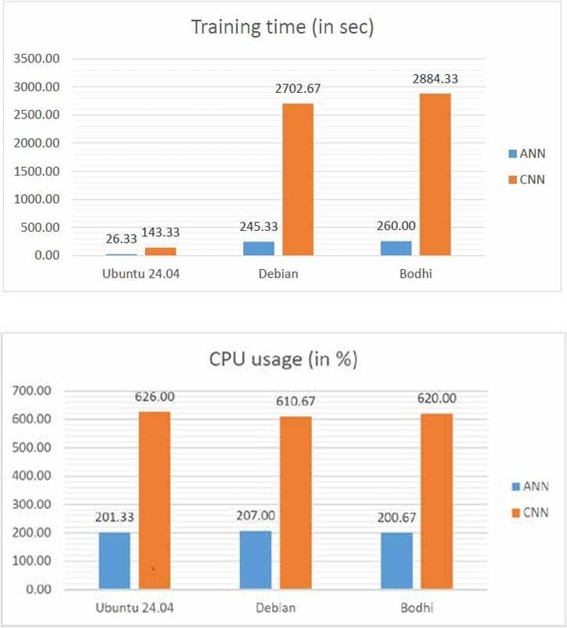
Same hardware. Same scripts. Same containers. Yet the training times sit miles apart.
The gap grows even wider with the convolutional network. That model is bigger and needs more resources. Still, Ubuntu’s lead holds no matter which AI library runs the training.
So why does this happen? I don’t have a firm answer yet. The cause could lie in each distro’s default configuration. It could also come from how each one works with virtualization and Docker. Pinning it down needs more testing.
What I do know is simple. If you train models on Linux, your distro is not a footnote. It can shape how long you wait for results.
Bodhi and Debian finish close to each other, with Bodhi slightly behind. And Parrot OS? It never gets to run this test at all. Its security defaults block my containers outright. That surprise deserves its own story, so I save it for my next post.
Result two: the lightweight underdog wins the math test
The pi test flips the leaderboard on its head.
Bodhi, the minimalist, comes out on top. It finishes fastest and uses the least memory. With fewer extras running in the background, more power goes to the actual work.
This matters far beyond my test machine. Think about small edge devices, budget cloud servers or older laptops. Every megabyte and every second counts there. A lean distro can stretch limited hardware much further.
Parrot OS takes second place. I don’t see that coming from a security-focused distro. It does use more memory than the rest, though.
That result reminds me how quickly we stereotype our tools. Security distros carry a reputation for feeling heavy and slow. On this task, Parrot proves that idea wrong.
Then comes the real twist. Ubuntu, my AI champion, now trails Debian. Remember, Ubuntu grows out of Debian. Something it adds along the way seems to cost a little speed here.
So the AI winner loses the math test. Meanwhile, the lightest distro of the four beats everyone.
What I take away from all this
A few lessons stay with me long after the tests finish.
First, “same kernel” does not mean “same performance.” Distros that look like near-twins behave very differently under load. You can’t assume one flavor of Linux equals another.
Second, no single distro wins everything. Ubuntu dominates AI training in my tests. Bodhi takes the crown for raw computation. The right pick depends on the job in front of you.
Third, defaults matter more than we admit. Yes, an expert can tune almost any distro for better speed. But plenty of teams never touch the default settings. For them, day-one performance is the real performance.
And finally, measure before you build. A few hours of testing costs very little. Months of slow training runs cost a lot more. If speed matters to your project, test your options first.
Where I go from here
This experiment raises as many questions as it answers. I want to know exactly why Ubuntu trains so much faster. I also want to see whether some AI libraries simply pair better with certain distros. And I’d love to repeat everything on real hardware, outside a virtual machine.
Those questions can wait for another day.
For now, my advice is simple. The next time you set up Linux for serious work, don’t just grab the familiar option. Spend an afternoon running a few tests. Your workload might have a favorite you never expected.
In my next post, I turn to the security side of the story. Parrot OS locks me out of my own experiment. That moment says a lot about the constant tug-of-war between security and convenience.